 |
JobTabs Job Search & Resume Builder 2013 | Submit feedback on this topic |
Glossary Item Box
|
JobTabs Job Search & Resume Builder 2013 | Submit feedback on this topic |
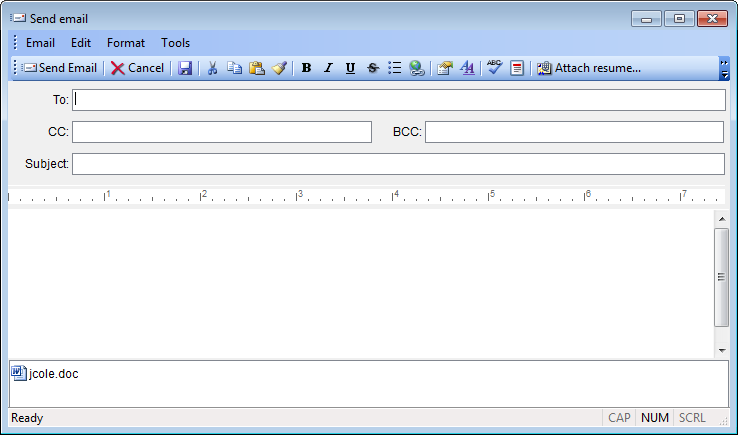
The email screen is very much the same as the screens on the main form with a few minor exceptions.
 Send Send |
Sends an email using the options you chose in the Options dialog. |
 Cancel Cancel |
Cancels the email, or abandons any changes you are making to a draft email. |
 Save Save |
Saves a copy of the email as a draft. All references to attachments will be saved, but the attachments aren't actually saved until the email is sent. |
The To:, CC: and BCC: fields all require actual email addresses. Names that have email addresses associated with them will not be recognized as such. All other icons on the toolbar work exactly the same as the editor toolbar on the main form. A complete description of the functionality of those buttons is provided in the links below.
A key benefit provided by JobTabs is sending your resume with a standard name. This lends itself to a "one candidate - one resume" impression and gives you more credibility if that resume is ideally suited to the job posting.
 |
While recruiters generally know that candidates have more than one resume; employers and the managers therein aren't quite so savvy. If they used to be in the know, it is unlikely they still are. Looking for a job is not like riding a bicycle. It is more akin to a phone number you used to have. If you don't use the skills - you lose the skills. You want to make a clear impression that the job to which you are applying is the only job of its kind you are looking for - regardless of how many resumes you really have. |
When you attach your resume to an email in JobTabs, the resume name you set up as a standard resume name in the Options dialog, will be the name applied to it when the email is sent. So, for example, if your name is Burton F. Mead, and you decided on "bfmead" as your standard resume name; no matter which resume you select to attach, the resume will be attached with the prefix "bfmead" followed by the document type such as "bfmead.doc", "bfmead.pdf", "bfmead.htm", etc. However, when the email is saved to JobTabs the title that is normally attributed to that resume will be listed. So if "bfmead" has a resume which is titled "Cost Accountant" in the resume tree, that resume will be sent from JobTabs as "bfmead.doc" but will show up in the activity as "Cost Accountant." This also serves as an indicator of the skills you are presenting to that prospect.
This is all in the name of keeping your records straight. Give it a shot and you will see how easy it is. Don't forget to set your standard resume name in the Options dialog first. JobTabs defaults the standard resume name to "resume" until you change it.
| See Also |
Editor Toolbar | Hyperlinks | Attaching a Resume | Attaching a File
Configuring JobTabs: Email Configuration
© 2005 - 2012 by JobTabs, LLC. All rights reserved.